Is it free? Do I need to log in?
Free, and there is no login in the panel. Sending does not use credits — you log in and use credits on the web only when downloading 3D files, as before.
SVG exported from Illustrator is the wrong size — how do I fix it?
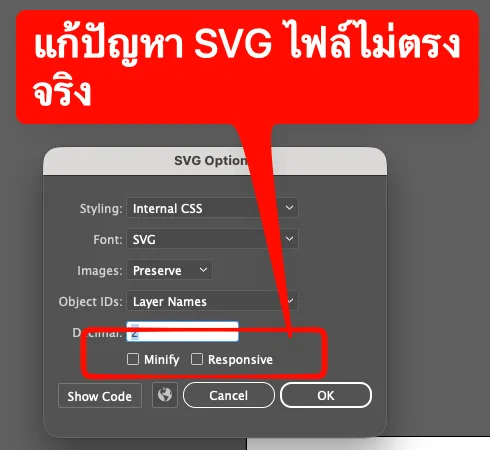
Illustrator stores SVG sizes at 72 units per inch while browsers and many programs read SVG at 96 per inch, so a 100 mm design opens at about 75 mm.
If you export SVG: in Export As → SVG, untick Responsive in the SVG Options window (leave Minify unticked too). The file then carries its size, which many laser/CNC programs need, and Aksorn3D reads Illustrator files at the real size. If it is still off, type the height you want in the app after uploading.
Even easier: send the artwork with Aksorn3D Send — the real size in millimetres comes from your document, no export needed. See the comparison
Do I need to Create Outlines or Convert to Curves before sending?
No. The panel converts text to outlines itself on a temporary copy, your original file is unchanged, and every font on your computer works.
Illustrator: I installed it but cannot see the menu
Quit Illustrator completely and open it again (panels load only at startup), and check you have Illustrator CC 2019 or later. If it is still missing, run the install command again and contact LINE @ndssoft.
What is sent? Are colours and strokes included?
Shapes with a fill are sent (text is outlined first), with their colours for multi-colour styles. Stroke-only items, raster images and hidden items are skipped — the panel warns you before sending.
Thai vowels show as dotted circles
The text uses the Latin paragraph composer, which some fonts cannot shape Thai with. What you see is what gets sent, so switch the composer in the Paragraph panel menu to a Middle Eastern & South Asian composer — the panel warns when it finds this.
Is client artwork stored?
Sent files stay in server memory for 30 minutes so the web can open them (you can refresh the page in that time), then they are deleted. Nothing is saved to the database except usage counts.
Does it work with CorelDRAW?
Yes — CorelDRAW X7 or later on Windows. Install it with the CorelDRAW command, then open Window → Dockers → Aksorn3D Send.
CorelDRAW: installed but the panel is not in Dockers
Quit CorelDRAW completely and open it again. Check you have X7 or later and .NET Framework 4.8 (the install command checks this and opens the download page if it is missing). If it is still missing, contact LINE @ndssoft.
